
TimeTrakGO Logo
AI Connect MCP Time Clock Integration2026-05-12T12:22:04+00:00

Ask Your AI Assistant
Anything About Your Team

AI Connect lets your AI assistant access TimeTrakGO instantly. Check hours, approve time off, update schedules, and manage your team with natural language questions.

Your AI Assistant · TimeTrakGO
You
You
Who’s clocked in right now, and do I have any pending time-off requests?
AI
AI Connect
9 employees are currently on the clock. You also have 3 pending time-off requests — Maria C. (Friday), James T. (Mon–Tue), and Devon R. (next Thursday). All three days look like you’ll have enough coverage. Want me to approve them?
You
You
Approve Maria and Devon. Also, who had attendance issues this week?
AI
AI Connect
Done — both approved. For this week: Carlos V. has a missing punch on Tuesday and Sarah M. is missing a clock-out from Monday.
How it Works

Three Steps and You’re Done

No technical setup, no new software to learn. If you already use an AI assistant like Claude, you’re most of the way there.

What you can do

Everything You Need to Manage Your Team

Ask your AI assistant about employee hours, schedules, time off, and more. Get accurate answers instantly without switching tools or logging into TimeTrakGO.
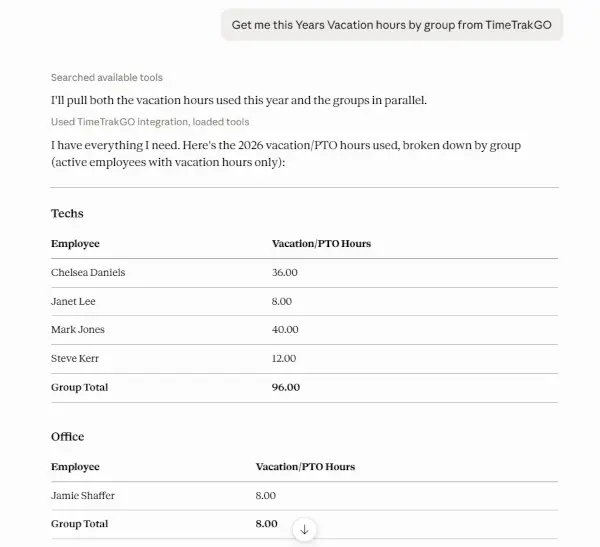
Real-World  Examples

Questions Real Managers Actually Ask

Whether it’s payroll day or the middle of a busy shift, AI Connect handles the questions that come up every week.

Payroll Prep

Close Payroll Without the Scramble

Get a full pay period summary, spot issues, and review overtime before you ever open a payroll report.

"Show me a pay period summary and flag anyone with overtime or missing punches."
Scheduling

Swap Two Employees in One Message

Trade shifts between employees without navigating menus. Just say who swaps with who and when.

"Swap Jamie and Steve's shifts on Friday."
Time Off

Approve PTO Without Switching Apps

See all pending requests, check coverage, and approve or deny without ever leaving your AI assistant.

"Show me pending time-off requests and check if anyone else already has PTO entered for the same dates."
Attendance

Catch Problems Before Payday

Get a quick rundown of missed punches, absences, and late arrivals so you can deal with them before payday.

"Who had attendance issues this week and what happened?"
Labor Costs

Know Where Your Hours Are Going

Ask how hours are distributed across departments or job types. Spot trends and manage costs without digging through reports.

"Break down last week's hours by department and flag anything that looks high."
Right Now

Instant Headcount, Any Time

Ask who's on the clock right now, whether you're managing a shift or need a quick headcount from your phone.

"Who's working right now and how long have they been on the clock?"

Built on MCP — The Open Standard for AI Integrations

AI Connect uses MCP (Model Context Protocol), an open standard that enables AI assistants to securely access business applications. This means your AI can connect directly to TimeTrakGO without requiring custom code or additional software.

Why it matters: You’re not locked into one AI assistant. Once TimeTrakGO supports MCP, you can use Claude, ChatGPT, or any other compatible AI tool to manage your timekeeping data.
  • Works with Claude and any other MCP-compatible AI assistant

  • Only accesses the data your account is authorized to see

  • Can answer questions and take action, not just read-only

  • As MCP grows, AI Connect supports more AI tools automatically

💬
You Ask a Question Type naturally — just like texting a coworker
🤖
Your AI Assistant Understands what you’re asking and knows how to get it
🔗
AI Connect via MCP The secure, open-standard bridge between your AI and TimeTrakGO
⏱️
Your TimeTrakGO Data Real hours, real schedules, real employees — live
You Get a Real Answer Or take action — approve, update, and more
time clock software errors

Simplify Employee Time Tracking

Try Free for 14-days

AI Connect
Frequently Asked Questions

Do I need to be technical to set it up?2026-05-12T12:21:06+00:00

Not at all. Setup takes just a few minutes and walks you through each step. If you already use an AI assistant like Claude, connecting AI Connect is straightforward. No coding, no IT department required.

Which AI assistants does this work with?2026-05-12T12:21:06+00:00

AI Connect is built on MCP (Model Context Protocol), an open standard that’s quickly becoming the go-to way for AI assistants to connect to business software. It works with Claude by Anthropic today, and as more AI tools adopt MCP, AI Connect will work with them too. No updates needed on your end.

What is MCP, and why does it matter?2026-05-12T12:21:05+00:00

MCP stands for Model Context Protocol, an open standard that lets AI assistants connect directly to business software like TimeTrakGO. It’s the technology that makes AI Connect possible. Because it’s an open standard (not a proprietary plugin), it’s supported by a growing number of AI tools, meaning your investment in AI Connect works today and stays relevant as the AI landscape evolves. You don’t need to understand how it works — just know that it’s a well-built, secure foundation.

Can it actually make changes, or just show information?2026-05-12T12:21:05+00:00

Both. You can ask questions and get information, and you can also take action. That includes approving or denying time-off requests, updating a single employee’s schedule, or rescheduling your whole team across multiple days at once.

Is my data secure?2026-05-12T12:21:05+00:00

Yes. AI Connect only accesses data that your TimeTrakGO account is authorized to see. There’s no third-party service in the middle. Your AI connects directly and securely to TimeTrakGO. Your data stays yours.

Can I see who is currently clocked in?2026-05-12T12:21:05+00:00

Yes, just ask. Your AI will give you a real-time view of which employees are currently on the clock. It’s a great way to get a quick headcount without opening the dashboard, especially when you’re managing a busy shift.

Can I approve time-off requests through my AI?2026-05-12T12:21:05+00:00

Yes. You can ask your AI to show you all pending time-off requests, and then approve or deny specific ones, all without leaving the conversation. No logging into a dashboard, no extra steps.

What attendance issues can it surface?2026-05-12T12:21:05+00:00

You can ask for a rundown of any attendance issues across your team — missed punches, absences, employees who clocked in early or late. It’s great for a quick daily check or a pre-payroll review to make sure nothing slips through.

What is TimeTrakGO AI Connect?2026-05-12T12:20:21+00:00

AI Connect is a feature that links your AI assistant (like Claude) directly to your TimeTrakGO account. Instead of opening TimeTrakGO to look something up, you just ask your AI. It can check hours, pull up schedules, show attendance issues, handle time-off requests, and more.

AI Connect

Stop Digging Through Reports. Just Ask.

What are you waiting for? Connect your AI assistant to TimeTrakGO and get set up in minutes.