
Stop guessing where your labor costs go
Most time tracking software tells you how many hours an employee worked. Labor allocation tells you what they worked on. That is the data that drives real business decisions.
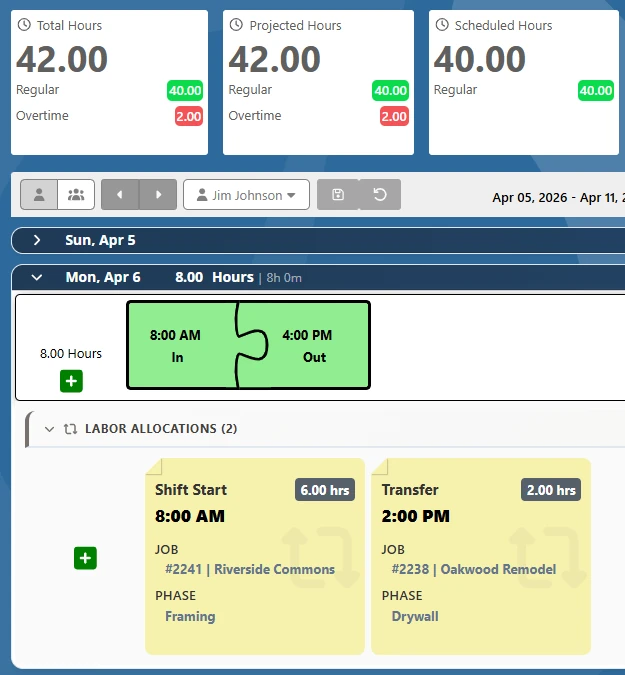
With TimeTrakGO, employees select their job, department, project, task, or custom category when clocking in. You get complete labor distribution data tied to every punch, accurate, automatic, and ready for payroll.
- Allocate hours to any combination of jobs, departments, cost centers, tasks, or custom categories
- Configure up to 4 levels with names that match your business
- Mid-shift transfers let employees move between categories without clocking out
HOW IT WORKS
Simple setup. Immediate visibility.
Configure your labor categories once and TimeTrakGO handles the data collection automatically from that point on.
What Sets TimeTrakGO Apart
Built for flexibility, not just construction
Most labor allocation tools are designed around a fixed job costing hierarchy. TimeTrakGO gives you a blank canvas.
Other tools lock you into "Customer / Job / Task." TimeTrakGO lets you define what each level is called so your team sees language that actually matches how your business operates.
Employees working across multiple jobs in a single day can transfer labor categories on the fly. The exact time of the transfer is recorded automatically, requiring no manual editing.
Make labor category selection required at clock-in. Employees cannot punch in without choosing, which ensures your allocation data is always complete instead of full of blanks to clean up later.
Assign each employee a default labor category. When they clock in, their home selection is pre-populated. Employees who always work in the same department can confirm their status in one tap.
Create as many entries in each category as your business needs. Whether you have 10 departments or 10,000 job codes, TimeTrakGO handles the volume without any additional cost per entry.
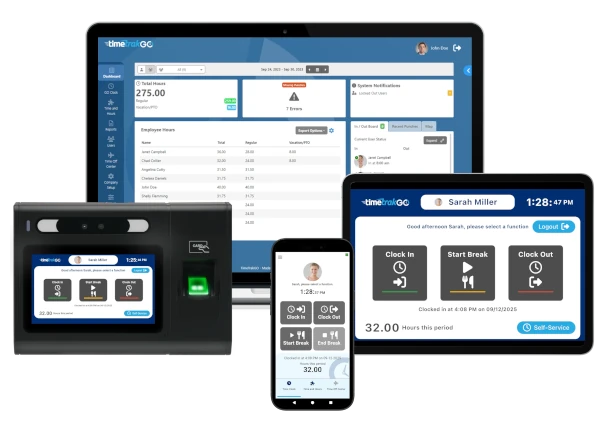
Labor allocation works across all TimeTrakGO clock types, including the mobile app, web login, web kiosk, PIN tablet, fingerprint, and facial recognition. Every method supports category selection.
Labor Allocation Works Differently for Every Business
Not every business tracks labor by job number and cost code. Some track by department and project. Some by client and task. Some by grant and program. TimeTrakGO does not force you into a fixed hierarchy.
You define the categories, name them whatever your team already calls them, and configure which selections are required. The system adapts to your workflow, not the other way around.
Frequently Asked Questions
Tired of messy timesheets or complicated time clock software?
TimeTrakGO ties every punch to a job or department automatically, so labor costs are accurate without extra data entry.













Finally, employee time clock software that’s simple to use.

Capterra
Shortlist
2026

Software Advice
Best Customer Support
2025

Software Advice
Front Runners
2026

Capterra
Best Value
2026
It’s GO Time!
Stop wasting time on spreadsheets and manual calculations. TimeTrakGO makes employee time tracking simple, accurate, and fast. Request a free demo today and see how easy payroll can be.
TimeTrakGO tracks punches, calculates overtime, and prepares employee hours for payroll export. GPS tracking and payroll integrations give managers the information they need to review time before running payroll.